

Edenred Mobility for professionals
With Edenred, commuting to work has never been so easy

What is Edenred Mobility for professionals?
The Edenred Mobility is the perfect solution to make your daily commute more economical and sustainable. You can cover the cost of public transport tickets and season tickets (underground, bus, tram) using part of your gross salary, which you can use to pay your allows you to save on your commute and stretch your salary up to 30% thanks to the personal income tax exemption.
Advantages of using Edenred Mobility
Sustainable transport
Tax advantages
Digital payment
Flexible Compensation
Getting more out of your salary is very easy: if you pay your day-to-day expenses through Flexible Compensation, these expenses are exempt from income tax. Food, childcare, public transport... It's as simple as that!

Related articles


Idoya Jordan
25 May 2026 | 5 min read


Fernando Palacios
22 July 2025 | Reading 3 mins

Idoya Jordan
04 February 2025 | Reading 3 mins
Idoya Jordan
25 May 2026 | 5 min read
Fernando Palacios
22 July 2025 | Reading 3 mins
Idoya Jordan
04 February 2025 | Reading 3 mins
Discover more advantages for you

Edenred Club
Discover a world of advantages that will make your day-to-day life easier. Access exclusive discounts and unique opportunities.
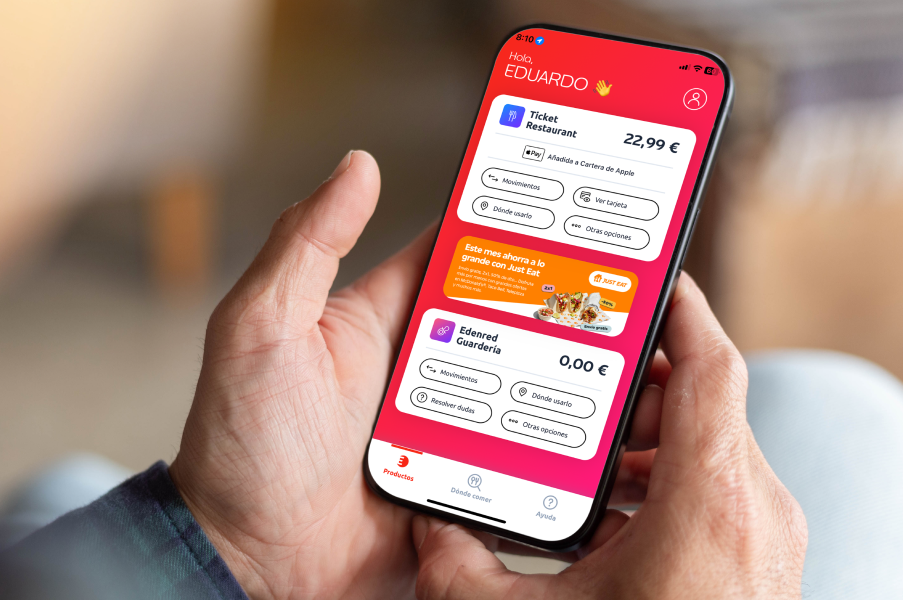
App Edenred Spain
Download the Edenred Spain app and take all your benefits with you: check your balance, manage your services and enjoy discounts in just one click.

Blog and channels
Follow us to keep up to date with news, tips and updates. Use these channels to share your opinions and questions with us.
Frequently asked questions about Edenred Mobility
What is Edenred Mobility and how does it work?
Edenred Mobility is a card that you can use to pay for your public transport passes. It works like a prepaid Mastercard, which you can add to your Apple Wallet or Google Wallet to pay directly from your mobile.
What's more, the money you use with Edenred Mobility is exempt from income tax, which means you pay less tax and get more out of your salary.
- You can allocate up to 30% of your gross annual salary to Flexible Compensation.
- Save up to 30% on your monthly subscription.
- Check movements and balance on the Edenred Spain app
How do I activate and manage my Edenred transport card?
- Download the Edenred Spain app or go to clientes.edenred.es.
- Log in with your username and password.
- Enter the activation code and the CVC2 code (on the back of your card).
- Choose your PIN to complete the activation.
Where can I use my Edenred Mobility?
You can use your Edenred Mobility card to pay for any type of monthly public transport pass at all points of sale that accept Mastercard cards. This includes stations, vending machines, physical ticket offices and compatible digital platforms.
Your card is valid for different means of transport: metro, bus, tram, suburban or medium-distance trains, provided that the operator accepts Mastercard as a form of payment.
In addition, Edenred Mobility is compatible with other discounts or special rates., such as the youth season ticket, the large family season ticket or reduced fares based on age or personal situation. All you have to do is select the type of season ticket that corresponds to you at the time of purchase and pay with your Edenred card.
- No geographical limitations within Spain
- Compatible with personal subscriptions
- Works also from mobile with Apple Wallet or Google Wallet
Can I pay with Edenred Mobility from my smartphone?
Yes, you can pay with your card via Google Pay or Apple Pay. Just add the card to your wallet from the app or from your Edenred Spain App.
Can I allocate as much as I want to Flexible Compensation or is there a limit?
You can allocate up to 30% of your gross annual salary to Flexible Compensation. If you wish, you can carry out a savings simulation here.
I have forgotten my PIN code, how can I retrieve it?
You can easily retrieve your PIN code from the app MyEdenred or from the web clients.edenred.co.uk following these steps:
From the APP
Log in to your MyEdenred APP account and select “Change or remember my PIN” in the menu of your Ticket Transport product.
You will need to enter your username and password and the CVC2 code found on the back of your card. Select “Remember PIN” and memorise your code or keep it in a safe place.
From the WEB
Log in to your private user area >> Select “Balance and Management” in the top menu and then “Product Management” in the side menu of your Transport Ticket >> Select “Change or remember PIN” >> Confirm your identity by entering your username and password >> Enter the CVC2 code found on the back of your card >> Finally, select “Remember PIN” and memorise your code or keep it in a safe place.
You can also retrieve your PIN code by calling 931 110 086 or 919 100 757.
Is the Edenred Mobility saving compatible with other additional discounts such as large family or youth season ticket?
Yes, you can purchase all types of monthly travel cards with Edenred Mobility.
How do I select my card PIN?
You will be able to choose the PIN number of your card during the card activation process via the app. MyEdenred or from our website clientes.edenred.es. To do so, you will have to access your private area with your username and password and follow the step-by-step instructions that will appear on the screen.
Before starting the process, have at hand your card and the accompanying document. You will need them to consult the activation code and the CVC2 on the back of the form. Once you have started the process, you must complete it to the end in order to choose your PIN.
Activate card >> Enter your username and password >> Enter the activation code >> Enter the security code CVC2 >> Choose your PIN
Remember that, in the case of physical cards, the option of choosing the PIN code is valid for cards issued as of 20 February 2023 and only via app and web (functionality not available via telephone).
Can I change my card PIN?
To find out if your card allows you to change your PIN, you can go to My Account from the app MyEdenred or from the web and select the option “Change or remember my PIN”. If this option is not available, the system will only show you the current card code, but will not let you change it.
If the PIN code modification is available, you must follow these steps:
From the APP
Log in to your MyEdenred APP account and select “Change or remember my PIN” in the menu of your Ticket Transport product.
You will need to enter your username and password and the CVC2 code found on the back of your card. Select “Change PIN” and choose a code that is easy to remember.
From the WEB
Access your private user area >> Select “Balance and Management” in the top menu and then “Product Management” in the side menu of your Transport Ticket >> Select “Change or remember PIN” >> Confirm your identity by entering your username and password >> Enter the CVC2 code >> Change PIN >> Choose new PIN.