

Ticket Restaurant for professionals
Say goodbye to cooking today and enjoy your time with Ticket Restaurant.

What is Ticket Restaurant for professionals?
Ticket Restaurant is the solution that allows you to enjoy your daily meals at work with tax advantages. With this card you can pay for your lunches at over 50.000 affiliated partners in Spain and on delivery such as Uber Eats, Just Eat and Glovo. In addition, by earmarking up to €11 per day of your gross salary to Ticket Restaurant, you stretch your salary and save on your meals because this amount is exempted from tax matters. Calculate how much you can save with our saving calculator.
Advantages of using Ticket Restaurant
Farewell to the tupper
Variety of options
Where to eat with Ticket Restaurant?
Find your favourite restaurants
SUGGESTIONS
SUGGESTIONS
Enter a search
How to use Ticket Restaurant?
Check your balance
Where to use it
Activate notifications
Don't lose the pin
Take your email
Limitations on use
Related articles


Cristina Carazo
7 January 2026 | 3 min read


Fernando Palacios
09 December 2025 | Reading 4 minutes


Olga Zografou
05 May 2025 | 5 min reading
Cristina Carazo
7 January 2026 | 3 min read
Fernando Palacios
09 December 2025 | Reading 4 minutes
Olga Zografou
05 May 2025 | 5 min reading
Discover more advantages for you

Edenred Club
Discover a world of advantages that will make your day-to-day life easier. Access exclusive discounts and unique opportunities.
App Edenred Spain
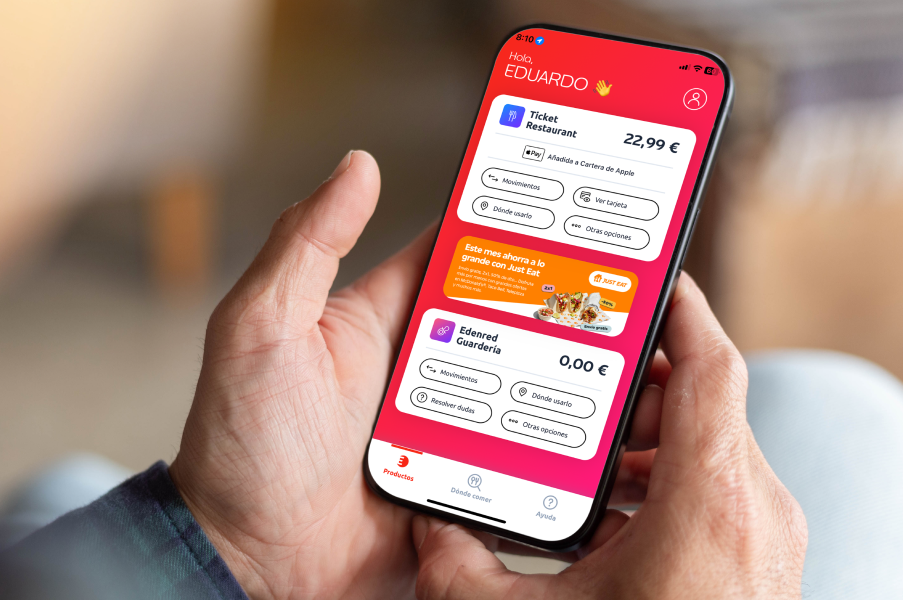
Download the Edenred Spain app and take all your benefits with you: check your balance, manage your services and enjoy discounts in just one click.

Blog and channels
Follow us to keep up to date with news, tips and updates. Use these channels to share your opinions and questions with us.
Because we care about tomorrow: Edenred and its commitment to sustainability

Share Ticket Restaurant: your help is needed
Contribute to those who need it most by donating Ticket Restaurant to Action Against Hunger and make a difference today.

Don't waste, make the most of: get to know Oreka Circular Economy
With Oreka we combat food waste, offering tools to manage surpluses and facilitate secure donations to social organisations.

Eat better with the help of the FOOD programme
Frequently asked questions from users about Ticket Restaurant
My company has offered me the virtual card, how does it work?
If you want to know all the keys to your Ticket Restaurant in virtual format, consult and solve your doubts.
How to activate the Ticket Restaurant card?
You will be able to activate your Edenred card through the app MyEdenred or from our website clients.edenred.co.uk. To do this, you will have to access your private area with your username and password and follow the step-by-step instructions that will appear on the screen.
Before starting the process, have at hand your card and the accompanying document. You will need them to consult the activation code and the CVC2 on the back of the form. Once you have started the process, you must complete it to the end in order to choose your PIN.
Activate card >> Enter your username and password >> Enter the activation code >> Enter the security code CVC2 >> Choose your PIN
You can also activate your card by calling 931 110 086 or 919 100 757.
What is the maximum amount I can use with Ticket Restaurant per day?
By law, the professional can receive and use a maximum of €11 per day worked., but each company chooses the final amount to be paid. Your company will inform you of the amount of your daily allowance.
Can I be deprived of restaurant tickets for teleworking?
Normally, if you already have restaurant tickets, the employer does not take them away from you when you telework.
But it depends on company policies and labour regulations: as it is not an entitlement defined by the collective agreement, some companies may decide that restaurant tickets are only granted to professionals working in the office, while others may offer them regardless of the place of work.
More information on restaurant ticket and teleworking
Can I have my meal tickets withdrawn if I have reduced working hours?
If the reduced working hours do not include a meal break, the employer is in theory justified in taking away your meal tickets.
How do I check the balance and movements of my card?
If you have already created your account from our app MyEdenred or from clients.edenred.co.uk and you have linked your card, all you have to do is identify yourself with your passwords to consult your balance, your movements and all the information you need.
When can I use Ticket Restaurant?
You may use your card at any time of the day, within your working hours, during your lunch break. In case your company has established a more specific usage framework (setting days, hours, or other restrictions), your HR department will inform you of these limitations.
Can I pay with Ticket Restaurant from my smartphone?
Yes, you can pay with your card via Google Pay, Apple Pay or Samsung Pay. Just link your card to one of these apps. Download them from your smartphone and follow the instructions.
If my card payment does not work, what do I do?
If your card has credit, is not expired or damaged and there is no limitation on use by your company, call us at 919100757 or 931110086 so that we can check if there has been a problem.
What should I do if my card is lost or stolen?
You can cancel directly from the app or from your online account. You can also call us at 919100757 and 931110086 (Mon to Thu from 9am to 6pm and Fri from 8am to 3pm).
Can I use my card in supermarkets?
Currently, the law allows the Ticket Restaurant card to be used in catering establishments, so it cannot be used in supermarkets. However, you can use your card in a large number of establishments that offer a home delivery service.
Can I change my card PIN?
To find out if your card allows PIN change you can access My Account from the app. MyEdenred or from the website and select the option “Change or remember my PIN”. If this option is not available, the system will only show you the current card code, but will not let you change it.
If the PIN code modification is available, you must follow these steps:
From the APP
Log in to your MyEdenred APP account and select “Change or remember my PIN” in the menu of your Ticket Restaurant product.
You will need to enter your username and password and the CVC2 code found on the back of your card. Select the “Change PIN” option and choose a code that is easy to remember.
From the WEB
Log in to your private user area >> Select “Balance and Management” in the top menu and then “Product Management” in the side menu of your Ticket Restaurant >> Select “Change or remember PIN” >> Confirm your identity by entering your username and password >> Enter the CVC2 code >> Change PIN >> Choose new PIN
How do I select my card PIN?
For physical Ticket Restaurant cards, you can choose the PIN number of your card during the card activation process via the app. MyEdenred or from our website clients.edenred.co.uk. To do this, you will have to access your private area with your username and password and follow the step-by-step instructions that will appear on the screen.
Before starting the process, have at hand your card and the accompanying document. You will need them to consult the activation code and the CVC2 which appears on the back of it. UOnce you have started the process, you will need to complete it to the end in order to choose your PIN.
Activate card >> Enter your username and password >> Enter the activation code >> Enter the security code CVC2 >> Choose your PIN
Remember that, in the case of cards in physical format, the option to choose the PIN code is valid for cards issued as from 20 February 2023 and only via app and web (functionality not available via phone activation).
In the case of Ticket Restaurant Zero, you can always choose your card PIN through the app. MyEdenred following the same process during activation.
I have forgotten my PIN code, how can I retrieve it?
For Ticket Restaurant in card format, you can easily retrieve your PIN code from the app. MyEdenred or from the web clients.edenred.co.uk following these steps:
From the APP
Log in to your MyEdenred APP account and select “Change or remember my PIN” in the menu of your Ticket Restaurant product.
You will need to enter your username and password and the CVC2 code found on the back of your card. Select “Remember PIN” and memorise your code or keep it in a safe place.
From the WEB
Log in to your private user area >> Select “Balance and Management” in the top menu and then “Product Management” in the side menu of your Ticket Restaurant >> Select “Change or remember PIN” >> Confirm your identity by entering your username and password >> Enter the CVC2 code found on the back of your card >> Finally, select “Remember PIN” and memorise your code or keep it in a safe place.
You can also retrieve your PIN code by calling 931 110 086 or 919 100 757.
In the case of Ticket Restaurant Zero, you can always retrieve your card PIN through the app. MyEdenred following the same process.
Do you have any further questions?
Check out our HELP PAGE to solve all your doubts!